

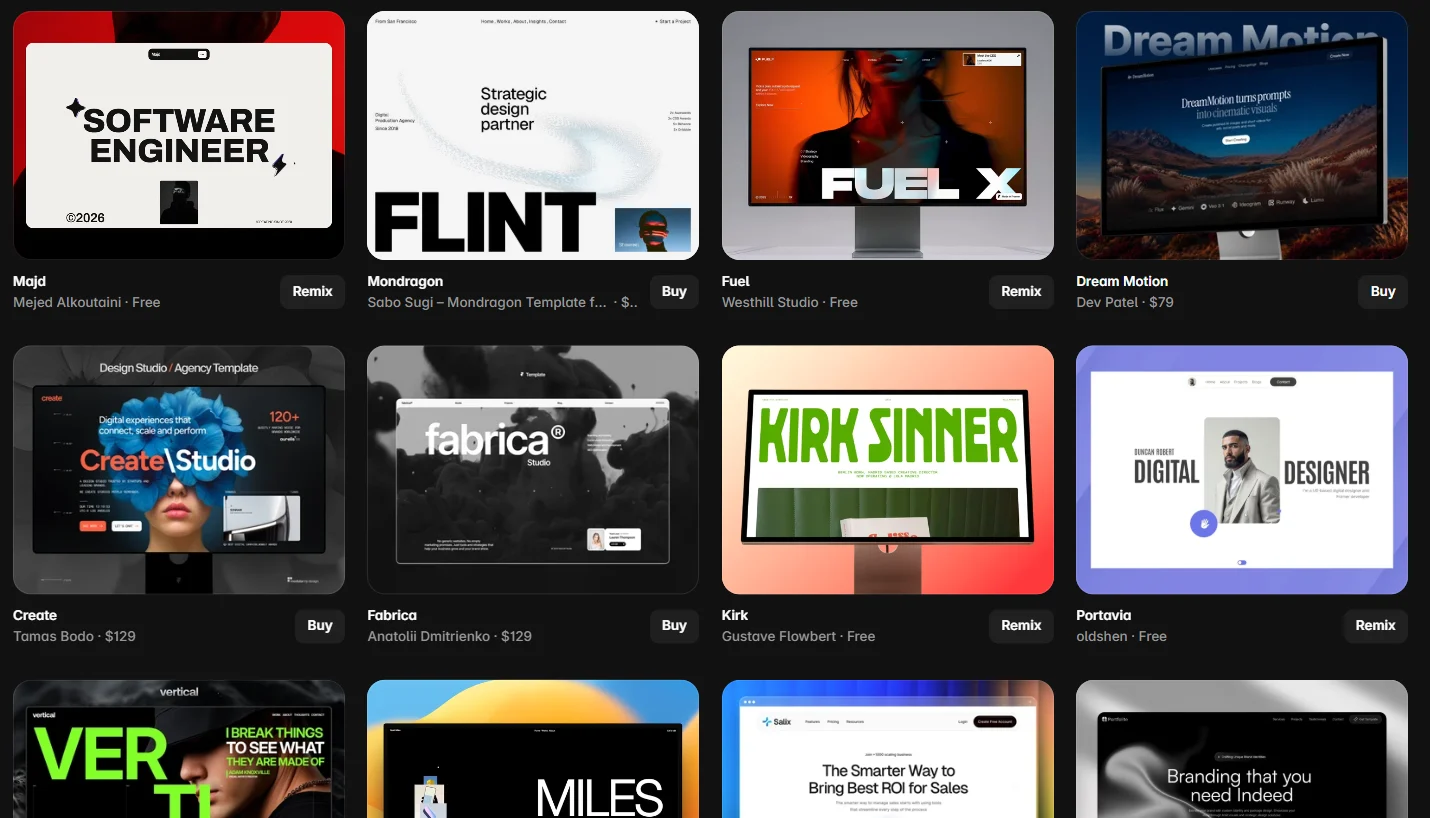
Framer has quietly become the fastest way to ship a genuinely good-looking marketing site — and its marketplace is a big part of why. Thousands of templates, many of them free, most of them a one-click remix away from being yours. That’s also the problem: when everything looks polished in a demo, picking the one that will still look polished with your content is the actual skill.
I build sites in Framer alongside my WordPress work, and template selection is where most projects are quietly won or lost. So this list does two things: it gives you 18 current picks, verified on the official Framer Marketplace with prices as listed in August 2026 — and it hands you the checklist I use before recommending any template to a client, so you can judge the next hundred yourself.

How to Judge a Framer Template (Before You Fall for the Demo)
Every template below — and every one you’ll find on your own — should survive these five checks in the live preview:
- The real-content stress test. Demos are art-directed: perfect photos, four-word headlines. Mentally swap in your longest project title and your least glamorous photo. Tight, hand-tuned layouts that only work with placeholder content break the day you add real work.
- CMS depth. If you’ll ever run a blog, case studies, or a careers page, check that the template ships real CMS collections — not just static pages. Retrofitting a CMS into a page-by-page template is where budgets go to die.
- Animation restraint. Motion should serve the content. If every section parallaxes, reveals, and floats, the demo feels alive — and your finished site feels exhausting. You can always add motion; removing it from fifty components is misery.
- Page coverage. Count the boring pages: 404, blog post, legal, contact. A template that includes them saves you a day; a template that doesn’t will have you designing a 404 at midnight before launch.
- Structure cleanliness. Open the remix and look at the layers panel. Named layers, sensible components, consistent breakpoints — that’s a template you can maintain. Chaos in the panel is chaos in month three.
Now the picks — grouped by what you’re building, with free options in every tier. Prices are as listed on the marketplace at the time of writing.
Trending on the Marketplace Right Now
These six were sitting on the marketplace’s front-page trending grid the week I wrote this — which, on a marketplace this competitive, is a signal worth respecting.

1. Gualdi — $49
By Satto.studio, whose templates keep landing in the trending grid (their Monocromo appears further down this list). A strong first candidate if you want current-feeling design without the three-figure price tag — run it through the real-content test with your longest headline before committing.
2. Indexy — $39
By Pixelpal Supply — the cheapest paid pick on this list, and trending anyway. At this price the calculation is simple: if the preview covers your page needs, it costs less than an hour of anyone’s design time.
3. Tomorrow — $59
By JP. Mid-priced and front-page trending — the sweet spot where most of my client picks land. Check the CMS collections in the remix before you buy if a blog is anywhere in your plans.
4. Scarlet — $99
By Thaer Swailem. At the $99 tier you should expect full page coverage — blog, 404, legal, the works — so hold it to that standard in the preview. Trending status suggests plenty of buyers think it clears the bar.
5. Hanza — $99
By Pawel Gola — one of the most prolific template studios in the Framer ecosystem, with a catalog deep enough that they sell a lifetime all-access pass. Buying from a high-volume studio has a quiet benefit: conventions stay consistent, and updates actually happen.
6. Mattis — $129
By Anatolii Dmitrienko, at the premium end of the trending grid. Templates in this bracket compete with hiring a designer for a day — which means the preview has to do more than look good: apply all five checks, especially structure cleanliness, because at $129 you’re buying the build quality, not just the look.
Best for Portfolios, Studios & Creatives
All six of these live in the marketplace’s Creative category, where the deciding factor is always the same: does the layout serve your work, or compete with it?
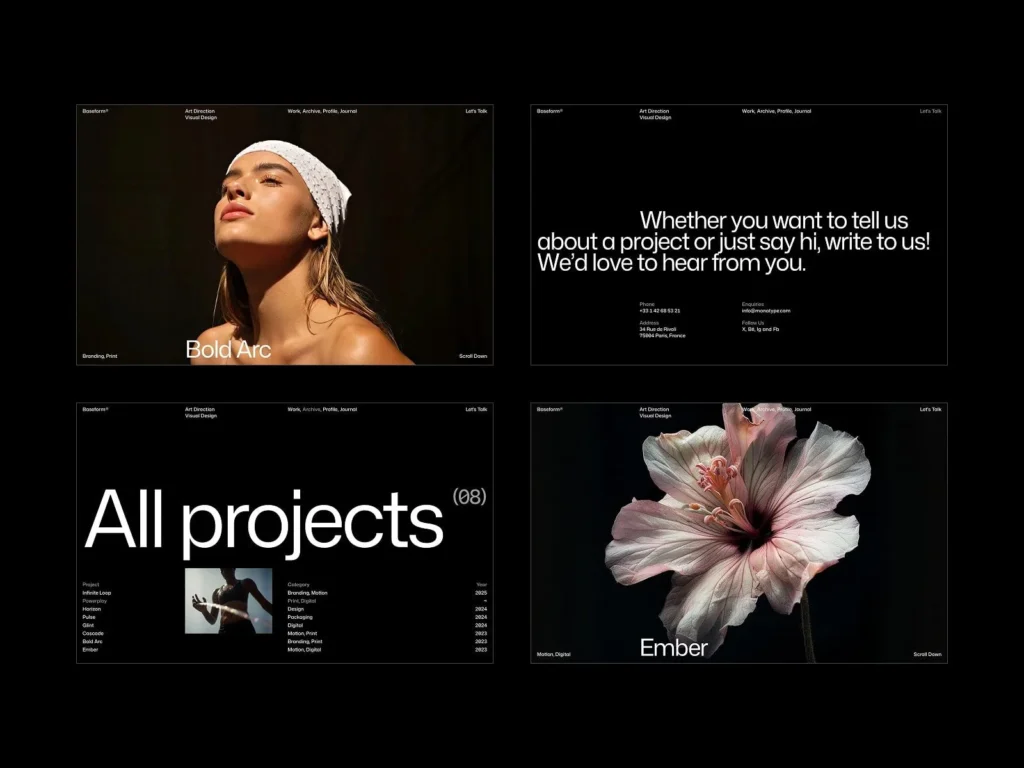
7. Baseform — $49
By ThemeRain, positioned squarely at agencies, freelance creatives, videographers, and studios building a work-first portfolio. One of the more frequently recommended portfolio templates around the Framer community right now, and sensibly priced for what it targets.
8. Vertical — $129
By Tamas Bodo, premium tier of the Creative category. For a portfolio at this price, the test that matters most is animation restraint — motion should frame your projects, not audition alongside them.
9. Monocromo — $89
Satto.studio’s second entry on this list — and as the name suggests, a monochrome direction, which is a genuinely smart constraint for portfolios: a neutral canvas makes colorful work pop and keeps mixed-media projects from clashing with the site itself.
10. Resize — Free
By Dawid Pietrasiak. Free portfolio templates are usually where corners get cut, so the fact that this one sits in the Creative category’s front ranks says something. Start here if your budget is zero and your work is strong.
11. Bold Design Portfolio — Free
By Michael Slotta — the name is the brief. If your work is loud, a quiet template mutes it; this is the free pick for designers whose projects can carry a heavyweight layout.
12. SwissMono — Free
By Swiss Themes. The name points at the Swiss-typography school — grids, type discipline, restraint — which happens to be the most durable style a portfolio can wear. Trends age; Helvetica-adjacent doesn’t.
Best for Business & Niche Sites
From the marketplace’s Business category — where the win condition isn’t beauty, it’s a visitor finding your offer, your proof, and your contact button without thinking.
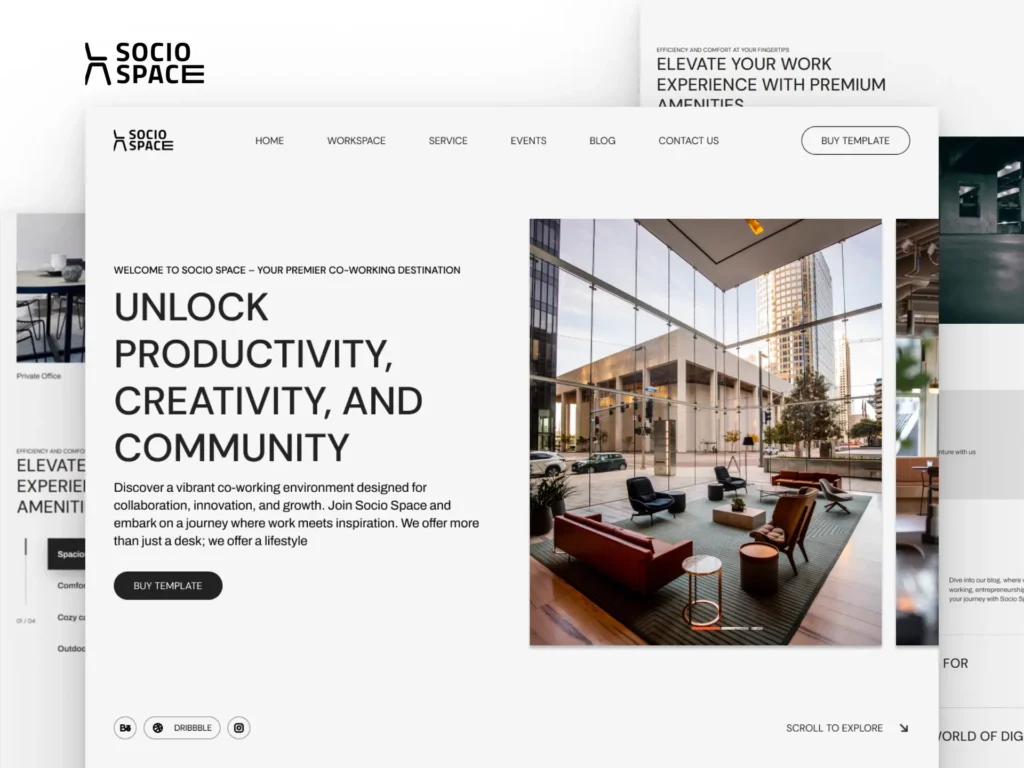
13. Socio Space — Free
By Marcframe, built specifically for coworking spaces and space-as-a-service businesses. Niche-specific templates like this earn their keep by shipping the sections you’d otherwise have to invent — and this one costs nothing.
14. CourseOS — $149
By Cédric — the most expensive pick on this list, aimed at course creators and education businesses. Selling a course means pricing tables, curriculum layouts, testimonial density, and FAQ structure; if those are all present and polished in the preview, $149 against course revenue is a rounding error.
15. Keynote — $99
By Marc Kuiper, premium tier of the Business category. Hold it to the full-coverage standard — at this price the boring pages should all be there, styled, and ready.
16. All Natural™ — $79
By ena supply. Mid-priced business pick; the trademark styling in the name tells you the creator treats templates as products, which usually correlates with maintenance. Verify CMS collections if content marketing is in your plan.
17. LUSTRA — $54
By NutsDev, one of the recognizable multi-template studios on the marketplace. A sensible mid-budget business option — and if it’s not quite right, the same studio’s catalog is worth a browse while you’re there.
18. StarkPro — $129
By Clonify, top of the Business category’s price range. Same rule as every premium pick here: you’re paying for build quality, so open the remix and inspect the layers panel before the beauty of the demo makes the decision for you.
Free vs Paid: the Honest Math
The marketplace has thousands of free templates, and several genuinely good ones made this list. The real difference paid buys you is usually coverage and consistency: more pages, deeper CMS collections, maintained updates. My rule for clients: if the site earns money, a $50–$130 template that saves two days of layout work pays for itself before lunch. If it’s a personal project, start free — the free category is deep enough that you may never need to upgrade. Either way, the template is only half the bill: my Framer pricing guide covers the site plan you’ll pay for to publish it.
Best Framer Templates for Artists, Musicians, and Trades
The picks above are general-purpose. If you’re building for a specific kind of business, these niche templates fit better out of the box. All were checked on the Framer Marketplace in October 2026.
Best Framer Templates for Artists
Artists need large images, an artworks archive, and a clear way to show exhibitions and availability. These three cover that at different budgets:
- Amadeus Art ($130, by Lucas Eriksen): the most complete artist template I found. It has 14 pages, CMS collections for artworks, exhibitions and projects, and artwork fields for price and for-sale status. Pick it if you sell work directly.
- Galerie Holm (free, by Salim from Webestica): an editorial gallery layout with a draggable hero gallery. Built for galleries and exhibitions, and it works well for an image-led artist portfolio.
- Galerie Art ($9, by STACKWELL): the cheapest paid option in the Artists category, for a simple online gallery.
Best Framer Templates for Musicians and Bands
A music site needs releases, tour dates, streaming links, and a booking contact. These three are built around exactly that:
- Volta Sunday (free, by Mr. Frame): a dark editorial template for musicians, bands, DJs, and producers. It includes sections for releases, music videos, tour dates, photo galleries, a journal, and a booking section for promoters and venues. The best free starting point for most artists.
- TRVNS ($54, by NutsDev): a bold, dark premium template for musicians, producers, and DJs, with space for releases, tour dates, and visuals, and clear streaming and booking links.
- Technomorph (free, by Gizem Onan): a free musician and band template in Framer’s Entertainment category, good for a simpler one-artist site.
Best Framer Templates for Electricians and Trades
Trade businesses win on calls and quote requests, not visuals. Look for a click-to-call button, service area, reviews, and a quote form. These two do it well:
- Tradesman (free, by Huehaus Studio): built for plumbers, electricians, HVAC, and roofers. It has an emergency call bar, a sticky call button, service area map, testimonials, FAQ, a CMS blog, and a quote and booking form. The best free pick for any local trade.
- Electrical ($59, by Salim from Webestica): a 6-page template for electricians and home service businesses that adapts to plumbing, HVAC, roofing, and solar. The listing reports a PageSpeed SEO score of 100 and performance of 92.
For a trade business, whichever template you pick, put your phone number in the header and your service area on the home page. Those two things drive more calls than any design choice.
Frequently Asked Questions
Are Framer templates free?
Thousands of them are — the marketplace has a dedicated free category, and four of the eighteen picks in this list cost nothing. Note that while the template itself can be free, publishing on a custom domain requires a paid Framer site plan.
Can I fully customize a Framer template?
Yes — remixing a template gives you a complete, editable copy of the project. Every layer, component, breakpoint, and CMS collection is yours to change. The practical limit is effort, not permission: the further your design drifts from the template’s structure, the closer you get to a custom build anyway.
Should I use a template or hire someone for a custom Framer site?
Use a template when your needs match its structure — standard marketing site, portfolio, or landing page — and your brand can live inside its layout logic. Hire a developer when you need custom CMS architecture, unusual interactions, integrations, or a design system that has to match an existing brand precisely. The expensive mistake is buying a template and then paying someone to fight it.
Are Framer templates good for SEO?
The platform outputs clean, fast pages, and templates inherit that — but a template cannot do your SEO. Heading structure, page titles, internal links, and actual content still decide rankings. Check that a template uses proper heading hierarchy in its sections rather than styled text, and you start from a healthy baseline.
Can I convert a Framer template to WordPress?
Not directly — there is no export path from Framer to WordPress. The design can absolutely be rebuilt in WordPress (typically via Elementor or a custom theme), which is worth considering when a project outgrows Framer’s CMS or needs WooCommerce, memberships, or plugin-dependent features. It’s a rebuild, not a migration, so factor that into your platform choice early.
Wrapping Up
Eighteen solid starting points — but the checklist matters more than the list. Run the real-content stress test, count the boring pages, open the layers panel, and any template you pick will still be serving you a year from now.
And if your project has outgrown what a template can do — custom Framer builds, Figma-to-Framer, or rebuilding a Framer design in WordPress when you need more machinery under the hood — that’s exactly the work I take on. Get in touch and tell me what you’re building.
Shahbaz Ali is a senior WordPress developer with 6+ years of agency experience, specializing in WordPress development, speed optimization, and emergency fixes.