

Quick answer: The best free Webflow templates right now are Portfolio Starter (by Webflow), Layout, Studiores and Finanex. The best paid ones are Clientflow and Nordlys for SaaS, Rama Studio for agencies, Vika for consultants and Oravix for clinics. Paid templates cost $39 to $169 as a one-time fee. Budget for a site plan on top: most templates use the CMS, which means the $25/month Premium plan (billed yearly), not the $15 Basic plan.
On November 7, 2026 I pulled every template on Webflow’s marketplace front page (41 in total) and checked each template’s own page for its price, designer, categories and features. Every pick below comes from that check. I describe each one by what Webflow lists for it, so open the preview before you buy.
What Webflow Templates Cost (From 41 Live Listings)
| Finding | Result |
|---|---|
| Templates checked | 41 |
| Free | 9 (22%) |
| Paid price range | $39 to $169 |
| Median paid price | $79 |
| Most common price | $79 (11 templates), then $59 (8) |
| Most common category | Creative Agency (17), then Design Portfolio (13) |
Two things stand out. First, the marketplace leans hard toward agencies and portfolios: 17 of 41 were tagged Creative Agency. If you run a dental clinic, a school or a trades business, you’ll find fewer choices, so I’ve picked the best of those below. Second, the price you pay a designer is the small part. The site plan is the bigger cost.
The Real Cost: Template + Site Plan
A template only gives you the design. To put it on your own domain you need a Webflow site plan, and here’s the catch most template lists don’t mention:
- Starter (free) only allows 2 static pages on a webflow.io address. A free template won’t fit on a free plan if it has more pages.
- Basic ($15/month, billed yearly) is for sites that don’t need a CMS. Up to 300 static pages, but no CMS collections.
- Premium ($25/month, billed yearly) includes the CMS. Any template with a blog, a projects list or team members stored as CMS items needs this plan.
- Ecommerce templates need an Ecommerce plan. Webflow’s own FAQ says you can’t remove Ecommerce from a template; you’d have to delete all products and categories to drop to a lower plan.
So a $79 template on Premium costs $379 in the first year ($79 + $300), and $300 a year after that. A free template on Premium costs $300 a year. Check the template’s page for the CMS and Ecommerce features before you buy, not after.
Best Free Webflow Templates
1. Portfolio Starter (Webflow)
Webflow’s own free starter for design, photography and video portfolios. It’s listed with forms, responsive navigation, web fonts and components. It comes from Webflow itself, so it’s a safe first template if you’re still learning the Designer. View Portfolio Starter.

2. Layout (Kedd)
Free, tagged for design portfolios and freelancers or consultants, with interactions included. A good pick if you’re a solo designer or consultant who wants a bold one-person site. View Layout.
3. Studiores (Studio81)
Free, built for creative agencies and IT companies, with components and interactions. One of the few free templates that fits a small agency or tech services company. View Studiores.
4. Finanex (Mezario)
Free, aimed at finance and accounting firms and software products, with components and interactions. Useful if you need a professional-services look without paying for one. View Finanex.
5. NeuriaAI (Orbix Studio)
Free, tagged AI and software, in a dark style. A fast way to launch a landing site for an AI or SaaS product. View NeuriaAI.
6. Hearthwell (digital4design)
Free, made for bakeries and cafes. Free food-and-drink templates are rare on the marketplace, so if you run a cafe this is the one to try first. View Hearthwell.
Best Paid Webflow Templates for SaaS and Tech
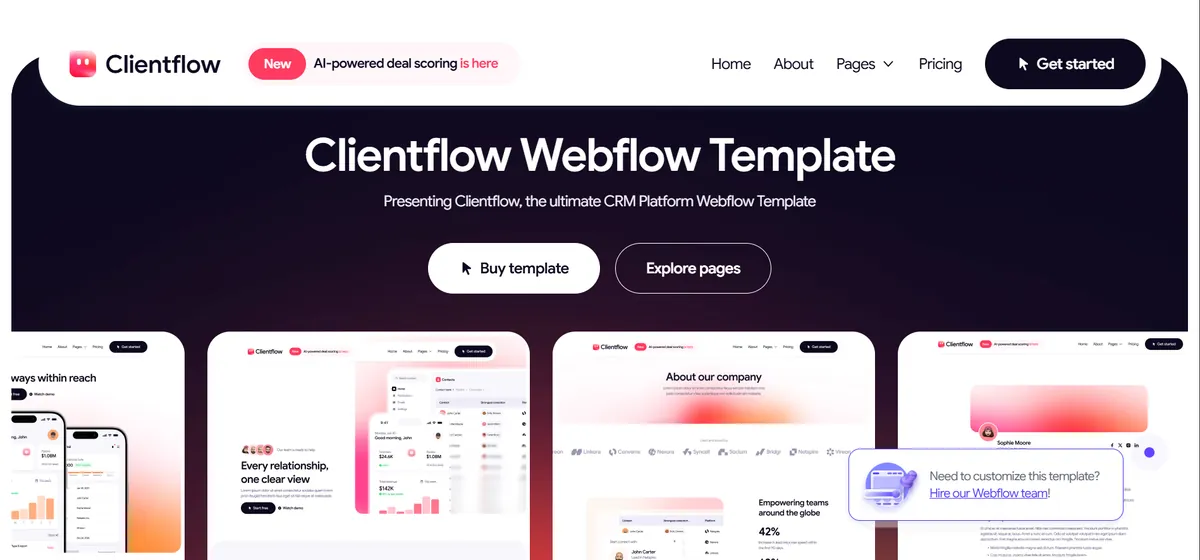
7. Clientflow (BRIX Templates) – $169
Tagged for software and marketing companies, with interactions. At $169 it sits at the top of the price range, so preview every page before buying and check the designer’s other templates to see how actively they publish. View Clientflow.
8. Nordlys (Flowmance) – $169
Tagged AI and software, dark style, with interactions. Pick this over NeuriaAI when you need a fuller product site rather than a single landing page. View Nordlys.
9. Omnisys (CaseFlow) – $79
Tagged corporate, IT company and software. A lower-cost option for an IT services business that wants to look established. View Omnisys.
Best Paid Webflow Templates for Agencies and Portfolios
10. Rama Studio (Velox Themes) – $99
Creative agency and design portfolio, with components and interactions. Components make a big difference on agency sites: edit a case-study card once and every copy updates. View Rama Studio.

11. Moddo (Kitpro Studio) – $39
The cheapest paid template I found ($39), tagged creative agency and design portfolio, with interactions. A good budget pick if the free agency templates don’t suit you. View Moddo.
Best Paid Webflow Templates for Local and Service Businesses
12. Vika (Margined) – $129
For consultants, coaches and finance or accounting firms, minimal style, with interactions. View Vika.
13. Oravix (GutoFlow) – $79
Built for dentists, clinics and pharmacies, with interactions. One of the few healthcare templates on the front page. View Oravix.
14. Bravik (Grabui Library) – $59
For home construction, home services and maintenance businesses, with components and interactions. A sensible price for a trades site. View Bravik.
15. Avenlo (Grid Okay) – $79
Tagged real estate and home construction. A fit for agents or builders who want to show listings or projects. View Avenlo.
16. Tinyloom (Radiant Templates) – $79
Made for early education and schools, with interactions. Education templates are scarce on the marketplace, so this one stands out. View Tinyloom.

How to Pick the Right Webflow Template
- Check the features list first. CMS means the Premium plan. Ecommerce means an Ecommerce plan, and it can’t be removed.
- Prefer templates with components. Editing one component updates every copy, which saves hours on bigger sites.
- Look at the designer, not just the design. An active studio with many templates is more likely to fix bugs and answer questions.
- Test the preview on your phone. Most visitors will see the mobile layout first.
Still deciding between platforms? My Webflow vs WordPress guide covers when Webflow is the right call. If you’re also looking at Framer, see my picks for the best Framer templates and Framer portfolio templates, plus Framer’s pricing to compare plan costs.
Frequently Asked Questions
Are there free Webflow templates?
Yes. Of the 41 templates on Webflow’s marketplace front page on November 7, 2026, 9 were free, including Webflow’s own Portfolio Starter, Layout, Studiores and Finanex.
How much do Webflow templates cost?
Paid Webflow templates cost $39 to $169 as a one-time fee. The median price in my check was $79. You also need a site plan to publish on your own domain.
Which Webflow plan do I need for a template?
If the template uses the CMS (blogs, projects, team members), you need the Premium plan at $25/month billed yearly. Templates without a CMS can run on Basic at $15/month. Ecommerce templates need an Ecommerce plan.
Can I use a Webflow template on the free plan?
Only for a very small site. The free Starter plan allows 2 static pages on a webflow.io address, so most templates need a paid plan before you can publish them in full.
Can I move a Webflow template to WordPress?
Not directly. Webflow can export static code, but CMS content and interactions don’t carry over as a working WordPress site. In practice, moving to WordPress means rebuilding the design in a theme or page builder.
Wrapping Up
Start with a free template if you’re testing Webflow: Portfolio Starter, Layout, Studiores or Finanex. If you’re buying, pick by your business type, check that the designer is active, and budget for the Premium plan if the template uses the CMS. That plan, not the template, is most of what you’ll pay.
Want the site built for you instead? I build fast Framer and WordPress sites from a template or from scratch. Get in touch and tell me what you need.
Shahbaz Ali is a senior WordPress and Framer developer with 6+ years of agency experience, specializing in WordPress development, Framer builds, and speed optimization.